On October 14, 2026, indie iOS developer Ahmet Buğra posted this on X:
"My apps are getting around 5K downloads a month now 🚀 Been working on ASO with appdrift.co, and honestly, @semrebayrak has been a huge help. He puts so much care into what he does, and we've seen some really nice results across my apps. Thanks for everything, man 🙌"
The obvious question is how one person gets that many downloads, and how much of it his listings explain. This ASO case study answers with what we could check. We read his AppDrift account (with his permission), looked up his apps on the public App Store in 12 countries on October 20, 2026, and went through the daily snapshots AppDrift has kept of his US listings since September 25.
Disclosure. Ahmet uses AppDrift on a Pro plan we provide at no charge. He has received 3,550 free tokens, 200 of them as rewards for reviewing AppDrift on Trustpilot and Product Hunt, and AppDrift's founder, Emre Bayrak (the @semrebayrak in his post), helps him with his listings. We can't see his App Store Connect downloads, so the 5,000 figure is his own. His results are not typical or guaranteed, and nothing below shows that a particular change caused them.
The short version
Ahmet's ASO is not a trick. It's five habits applied across his apps, plus two gaps he hasn't closed yet.
- Many small apps, each built around one task people search for: a photo cleaner, an app lock, a trading-card price scanner.
- Titles that name the task in plain words next to a short brand, using 23 to 30 of the 30 characters Apple allows.
- Listings in 39 to 50 languages for eight of his nine live apps, with the title rewritten around each market's own search words rather than translated line by line.
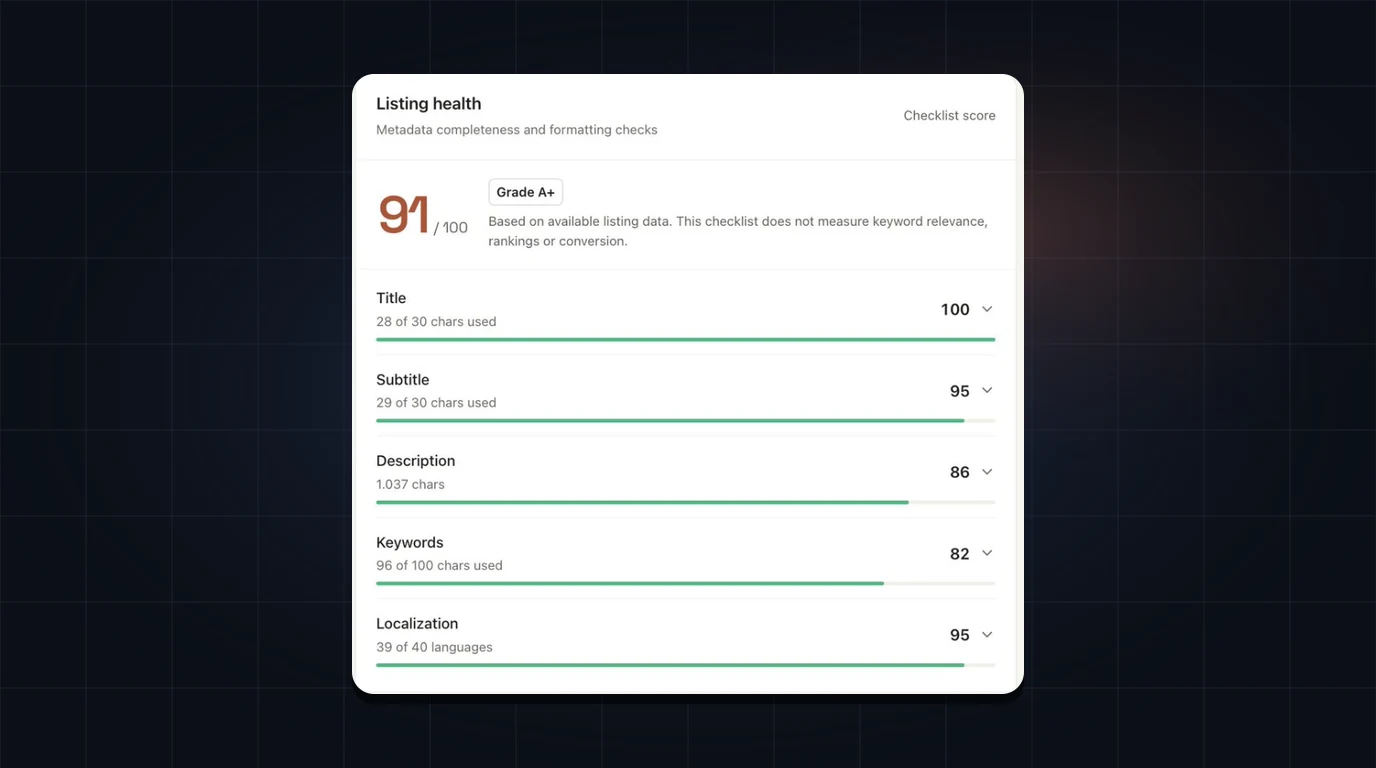
- Full fields: the listing he showed uses 28 of 30 title characters, 29 of 30 subtitle characters and 96 of 100 keyword characters.
- Titles that change. Two of his apps changed their US titles in October alone, both toward the task.
The gaps: very few ratings, and keyword tracking that isn't set up to measure anything yet. Both are covered below.
Twelve apps in eleven months
Ahmet connected his first app to AppDrift on November 20, 2025 and his twelfth on October 17, 2026. Nine are live on the App Store. All nine are free to download, and they sit in seven different categories.
| App (US title, October 20, 2026) | Category | First release | Listing languages |
|---|---|---|---|
| FlickOut: Photo Cleaner | Utilities | Nov 11, 2025 | 50 |
| Wavify: Audio Tone Generator | Music | Dec 1, 2025 | 39 (50 sent Oct 12) |
| Vision Board: Goals & Success | Lifestyle | Dec 31, 2025 | 39 |
| AppLocker: Face ID App Lock | Productivity | Jan 5, 2026 | 39 |
| FaceForm: Face Shape Scan | Lifestyle | Feb 27, 2026 | 39 |
| Manix: Virtual Nail Art Studio | Lifestyle | May 7, 2026 | 50 |
| NoseLook: AI Nose Job Preview | Photo & Video | May 18, 2026 | 1 |
| Cardfy: TCG Card Price Scanner | Reference | Jun 11, 2026 | 50 |
| UPTALL: Height & Weight Log | Health & Fitness | Sep 18, 2026 | 50 |
Titles, categories and first-release dates from Apple's public lookup, US store. Listing languages are the App Store Connect localizations recorded in his AppDrift account. Three more connected apps were not public in the US store on October 20 and are left out.
Read the titles again and you'll notice none of them depends on the brand being famous. Each one is a short brand plus the job, which is how a stranger finds a small app.
The portfolio matters for reading his number, too. By his own description, the 5,000 a month is a total across his apps. It may come mostly from one or two of them; we can't tell how it splits.
Habit 1: put the search phrase in the title
Apple says search results depend on text relevance, meaning matches in your app's title, subtitle, keywords and primary category, and on user behavior such as downloads, ratings and reviews.[1] The title is the one field that is both searched and read by every person who sees your app in the results, and Apple caps it at 30 characters.[2]
Ahmet's pattern is the same every time: a short brand, a colon, then the task in the words a searcher would type. Seven of his nine brands are a single word of five to eight letters.
- Cardfy: TCG Card Price Scanner uses all 30 characters and names three things a collector might search: TCG, card price and scanner.
- AppLocker: Face ID App Lock repeats the task inside the brand and still adds the feature people ask for by name.
- NoseLook: AI Nose Job Preview says what you get before you open the page.
A short brand is the quiet part of this. Every letter of brand is a letter you can't spend on the task. Our guide to App Store title optimization goes through the trade-offs if your brand is already long.
Habit 2: localize the search phrase, not the sentence
This is the part of his listings worth copying first. Apple's App Store localizations reference lists 50 languages and locales for app metadata, and each one carries its own name, subtitle and keyword field.[3] Eight of Ahmet's nine live apps have between 39 and 50 of them. The four apps he set up first had 39 in our records, and on October 12 he sent Wavify's listing in all 50. Four of the five he added from May 2026 use all 50; NoseLook, still in one language, is the exception.
Do the arithmetic. One language gives you 160 characters of searchable text: 30 for the name, 30 for the subtitle, 100 for keywords. Fifty languages give you up to 8,000.
More interesting than the count is what he put in them. His titles are rewritten for each market around the task people there name, so the same app reads differently from store to store:
Wavify
| Store | Title after the brand |
|---|---|
| US | Audio Tone Generator |
| Germany | Tonfrequenzgenerator ("tone frequency generator") |
| Japan | スピーカーの水抜き・周波数ジェネレーター ("speaker water removal, frequency generator") |
| Brazil | gerador de frequência ("frequency generator") |
| France | fréquences et sons ("frequencies and sounds") |
FlickOut
| Store | Title after the brand |
|---|---|
| US | Photo Cleaner |
| Germany | Fotospeicher säubern ("clean up photo storage") |
| Japan | 写真整理 スワイプ削除 ("photo organizing, swipe to delete") |
| Brazil | Limpar Fotos Rápido ("clean photos fast") |
| France | Nettoyer Photos ("clean photos") |
Cardfy
| Store | Title after the brand |
|---|---|
| US | TCG Card Price Scanner |
| Germany | Kartenwert & Bewertung ("card value and appraisal") |
| Japan | トレカ価格スキャン鑑定査定 ("trading-card price scan, appraisal, valuation") |
| Brazil | Scanner De Cartas TCG ("TCG card scanner") |
| France | (brand only) |
Public App Store titles on October 20, 2026, brand prefix removed. The English glosses in quotes are ours.
Look at the Japanese Wavify title. The US version sells a tone generator. The Japanese one leads with 水抜き, getting water out of a phone speaker, which is the job the app does after a phone gets wet. The Japanese Cardfy title uses トレカ, the everyday Japanese short form for trading cards, and stacks two words for valuation. The German FlickOut title names Fotospeicher, the photo storage people run out of, rather than translating "cleaner".
That is the difference between translating a listing and localizing it. A literal translation of "Photo Cleaner" is grammatical in every language and still might not be what anyone types. If you want the longer version of this argument, our article on choosing languages for app localization covers which questions to settle per market.
The French Cardfy row is the honest exception: the title is the brand alone, which leaves 24 of 30 characters unused in that store. Even a careful portfolio has gaps like this, and they are cheap to fix.
How he produces 50 languages as one person
He doesn't write them by hand. His account shows 37 AI listing drafts and 52 keyword-idea runs since November 2025. Five of those drafts cost 350 tokens each, which is the price of a 50-language iOS draft at AppDrift's metadata generation rate of 7 tokens per language. Wavify went from 1 listing language to 39 on November 25, 2025, five days after he connected it and six days before its first release.
Drafts are a starting point. A model can still pick a term nobody in that market types, so a review pass per language is part of the job.
Habit 3: use the space you're given
The image at the top of this page is the AppDrift listing check Ahmet shared with his post. It covers one of his apps:
- Title: 28 of 30 characters.
- Subtitle: 29 of 30 characters.
- Keywords: 96 of 100 characters.
- Description: 1,037 characters, against Apple's 4,000 limit.[4]
- Localization: 39 languages.
The score is 91 out of 100, and the card says plainly what that score is not: it "does not measure keyword relevance, rankings or conversion." A full field with the wrong words is still the wrong words. What the check catches is the cheap mistake, such as a subtitle left at 12 characters in a store where you have nothing else.
For the keyword field, Apple's own rules are worth rereading: separate terms with commas and no spaces, and don't repeat words already in your name, subtitle or category.[1] Repeats waste the 100 characters. Our keyword research guide walks through filling that field from scratch.
Habit 4: titles that moved from the idea to the task
His titles don't stay fixed. When he connected his apps, his account recorded names like Clean Wave, NoseFix, Manix: Nail Art Design and FaceForm: AI Face Shape Finder. Today they read Wavify: Audio Tone Generator, NoseLook: AI Nose Job Preview, Manix: Virtual Nail Art Studio and FaceForm: Face Shape Scan.
Two renames happened while we were watching, so we can date them:
- Wavify. On October 12, AppDrift sent his new listing text for 50 languages to App Store Connect, and Apple accepted it. Version 1.4 came out on October 18, and from October 19 the US title read "Wavify: Audio Tone Generator" instead of "Wavify Clean Wave: Sonic Clean". The US description went from 2,524 characters to 1,077.
- UPTALL. On October 11 he sent a 50-language update; from October 14 the US title read "UPTALL: Height & Weight Log" instead of "UPTALL: Grow Taller Height".
We don't know why he chose these renames. What we can see is the direction: "Sonic Clean" describes the idea behind the app, while "Audio Tone Generator" describes what someone types. Both changes move from the first kind of title to the second.
Timing matters here. Apple lets you change the name when you create a new version,[2] so a rename rides along with a release. Promotional text, 170 characters above the description, can change without a new submission,[4] but it isn't one of the fields Apple lists for search text relevance. Plan title changes with your updates, and use listing updates to prepare all the languages before the version goes to review.
Did these two renames help? We don't know yet. They are days old, and we have no download data for his apps.
Habit 5: get the listing ready before launch
Six of his nine live apps were in AppDrift before their first release: Wavify, Vision Board, AppLocker, FaceForm, NoseLook and Cardfy. Wavify had 39 listing languages before its first day on the store.
That order makes sense for a small developer. Launch day is when you have the least time, and a new app has no ratings or download history to lean on, so the listing text carries more of the load. He also keeps shipping: Wavify reached version 1.4 on October 18, AppLocker 1.2 on October 3 and UPTALL 1.1 on October 13, and every version is a chance to revise the name.
What we couldn't verify, and what he hasn't done yet
A case study that only lists the good parts isn't much use. Here is the rest.
- Downloads. AppDrift requested Apple's analytics reports for all twelve of his apps, and Apple turned down every request made with the key his account uses. He hasn't imported a download report either. We have no download, impression or conversion figure for any of his apps, so "about 5,000 a month" is his number, not ours.
- Before and after. Our daily snapshots of his US listings start on September 25, 2026. Most of his localization work happened months earlier, so we can't compare his listings before and after it.
- Ratings. Across the 12 storefronts we checked, his nine live apps have 40 public ratings between them; AppLocker has the most with 14. Ratings are not downloads, and most people who install an app never rate it. Still, Apple names ratings and reviews among the behavior signals in search,[1] and Apple lets an app show its rating prompt up to three times in a 365-day period, ideally right after the user finishes something.[5] This is the cheapest lever he hasn't pulled. Our guide on getting more app reviews covers when to ask.
- Keyword ranks. He tracks two keywords, both Turkish, and both are checked in the US store. They show no rank in any of ten daily checks, which says nothing about Turkey. Track a phrase in the storefront where people search in that language.
- Accepted is not live. Between October 8 and 12, Apple accepted 377 field updates that AppDrift sent for three of his apps. Apple accepting text is not the same as the text being on the store; we have confirmed the two title changes above, not every field.
Copy the playbook
None of this needs a team. Here's the order we'd follow if you want to try his approach on your own app:
- Name the job. Write down what someone types when they need your app, in their words, not yours. Start typing it into the App Store search box and note the suggestions.
- Write the title as brand plus job, under 30 characters. Keep the brand short.
- Use the subtitle for a second phrase and the keyword field for the remaining terms, with no words repeated across the three.
- Localize around each market's search words. Start with a handful of languages you can review, then extend. AppDrift's listing translation researches each store's suggestions before writing.
- Ship text changes with your next version, and check the live store afterwards. An accepted update isn't a published one.
- Track a few keywords in the right storefront. Keyword rank tracking checks them daily, so a rename has a before and after.
- Ask for ratings after a moment of success, within Apple's three-prompts-a-year limit.
What it costs: AppDrift's Free plan covers one app, five tracked keywords and 50 tokens at signup, which pays for a seven-language iOS draft at 7 tokens per language. A portfolio like Ahmet's needs a paid plan; the pricing page lists current app limits and monthly tokens. If you're just starting with ASO and want the zero-budget basics first, read ASO for indie developers.
Frequently asked questions
How many languages can an App Store listing have?
Apple's App Store localizations reference listed 50 languages and locales for app metadata when we checked on October 20, 2026. Each one has its own name, subtitle and keyword field.
Can I change my app's name after it's live?
Yes. Apple lets you change the name when you create a new version, so the new name goes live with that release. Promotional text can change at any time without a new submission.
Will translating my listing increase downloads?
Not by itself, and this case study can't show that it did for Ahmet. A localized listing gives your app text to match in more markets. Whether that brings downloads depends on demand in those markets, your rank, your screenshots and your ratings.
How long did his title changes take to appear?
Wavify's new text was accepted by Apple on October 12, its version 1.4 was released on October 18 and the new US title appeared on October 19, 2026. Your timing depends on when you submit the version and how long review takes.
Is 5,000 downloads a month typical for an indie developer?
We don't know, and we can't verify Ahmet's figure because we have no access to his download data. It's his own report for a portfolio of nine live apps, built over eleven months, with personal help from AppDrift's founder. Treat it as one developer's result, not a forecast.
Sources
- Apple: App Store search, ranking factors and keyword rules
- Apple: App information, name and subtitle limits
- Apple: App Store localizations
- Apple: Platform version information, description and promotional text
- Apple: Ratings, reviews and responses
- Ahmet Buğra on X
Method: account figures come from read-only queries of Ahmet's AppDrift workspace on October 20, 2026, shared with his permission. Public figures come from Apple's lookup API for the US, Turkey, UK, Germany, France, Brazil, India, Japan, Saudi Arabia, Italy, Spain and Mexico storefronts on the same day. Listing snapshots are AppDrift's daily US-store copies of his listings from September 25, 2026. No download, impression or conversion data was available.