Store publishing
Send your reviewed listing updates.
Prepare listing text in AppDrift and send supported fields to App Store Connect or Google Play. Keep review, saving and the store action under your control.
Paid plans · Store connection required · Listing content, not app binaries
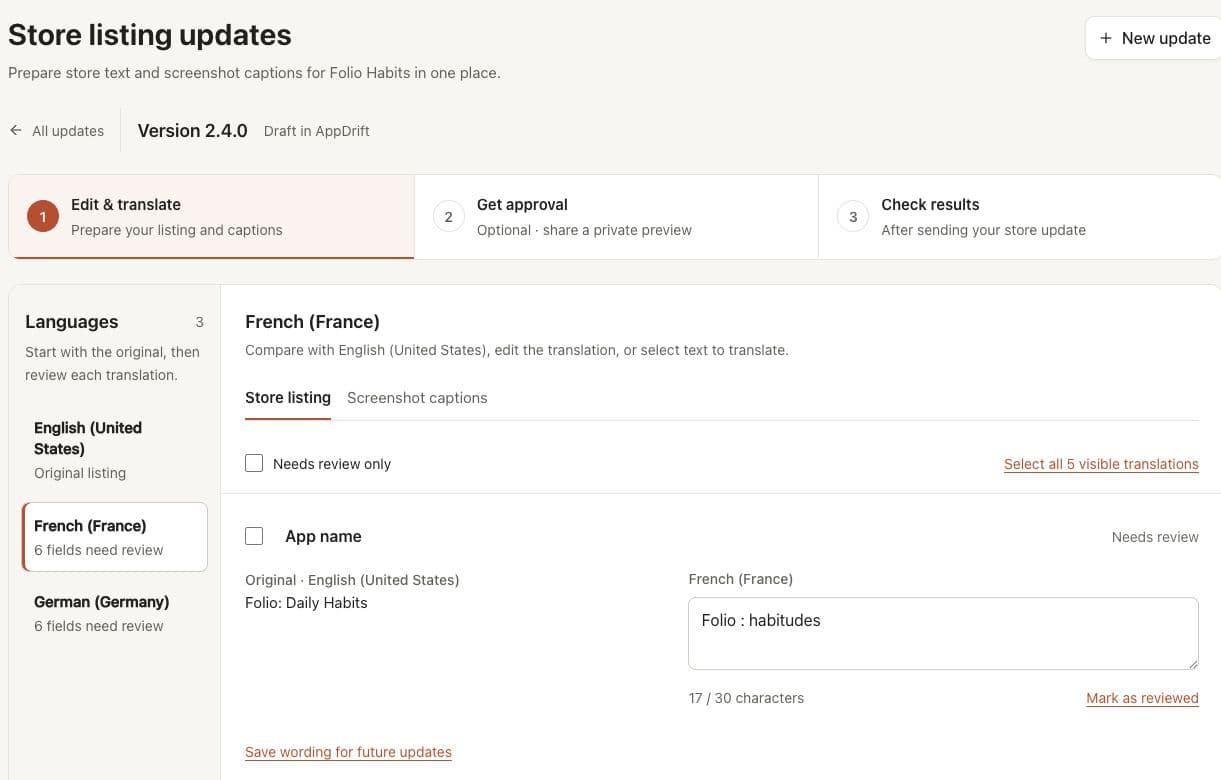
Prepare text in Listing updates before sending from the version editor. Fictional Folio app; no store write shown.
Deploy pipeline
From reviewed draft to store response
Prepare the content, review the selected fields, send the update and check the response. This diagram explains the steps; it is not a live deployment.
Review listing metadata before publishing
Listing text prepared for each market
Push metadata to both stores
Check store status and the public listing
Prerequisite: connect App Store Connect (API key) and Google Play (service account) for the store you want to update. Setup guides: App Store Connect · Google Play.
Before sending
A saved draft is ready for review.
Prepare listing text and screenshot captions in Listing updates. Optional client approval belongs to the reviewed version; it does not send the update.
Explore Listing updates, then open the version editor for an explicit store sync. Check the store response and current public listing separately.
Storefront examples
Prepare the languages your app supports
These are examples of storefront regions. Store availability and publication remain controlled by your store account and review process.
Americas
Europe
Asia Pacific
Middle East & Africa
Capabilities
Advanced publishing features
Publishing controls for developers who need more than a one-shot push.
Listing metadata sync
Send reviewed listing text to your connected store account using the explicit sync action.
Update Management
Prepare and save listing updates before sending them. Review which version and languages are selected.
Pre Launch Review
Check your wording, required fields and lengths before sending. Text validation does not guarantee store approval.
Separate store actions
Saving an AppDrift draft does not submit it. Choose when to send the supported listing update.
Screenshot Upload
Upload to an App Store Connect draft in one click after setup on a paid plan. Export screenshots for Google Play.
Store evidence
Review available store responses, public observations and supported imported reports after an update.
FAQ
Common questions
It sends reviewed listing text and supported localizations to your connected App Store Connect or Google Play account. App binaries are delivered through your existing build tools and store submission process.
Store publishing is included in the paid plans, Indie and Studio. You can prepare drafts on Free with the included AI tokens, then compare plans before using paid store actions. Creating an account does not send any changes.
Paid plans can upload a saved screenshot set to an App Store Connect draft after setup. This replaces the selected draft screenshot sets and does not submit or publish the app. For Google Play, export the artwork and upload it in Play Console.
Check product claims, language, required fields, character limits and screenshot layouts. AppDrift provides preparation tools, but passing a text check is not store approval. Apple and Google control their review and publication processes.
No. An accepted store write is a response from the store API. It does not confirm the complete listing is public. Review the store status and available public observations before treating an update as published.
Use App Store Connect or Google Play Console for binary submission, release scheduling and phased binary rollouts. AppDrift focuses on preparing and sending listing updates.
Ready to prepare your next listing update?
Compare paid plans and connection requirements, then review your draft before sending it.
Send reviewed listing content to a connected store
Prepare your text in the listing editor, review your translations, and copy approved work from Listing updates into your saved drafts. Choose the relevant store action when the draft is ready.
AppDrift sends supported listing fields and localizations. App binaries, release scheduling and phased binary rollouts remain in your build tools and store consoles. An accepted API write does not prove that every field is publicly available or that the store approved the app.
Paid plans support saved screenshot-set uploads to App Store Connect drafts after setup. This replaces selected draft screenshot sets without submitting the app. Export Google Play artwork for manual upload. See pricing, Apple setup and Google setup before starting.