ASO localization means researching and writing your store listing for each market, in that market's language. On the App Store that covers the name, subtitle, keyword field, description and screenshots of each localization; on Google Play, the name, short description, full description and graphics of each language. It isn't the same as translating your app's interface, and it isn't a word-for-word copy of your English listing, because people in each market search with their own words and each language fits differently into the same character limits.
Checked October 7, 2026 against Apple's App Store Connect Help and Google's Play Console Help. The language figures come from AppDrift's production database: 5,304 live App Store keyword fields and 558 listing-generation jobs, read as aggregates (method at the end). AppDrift is our product.
ASO localization vs app localization
App localization translates what people see inside your app: strings, dates, currencies, layouts. ASO localization translates and rewrites what people see before they install: the product page and the words it can be found by. The two are independent. You can localize a listing for a market before the app itself speaks that language, as long as the listing doesn't promise what the app can't do, and a fully translated app with an English-only listing is still mostly invisible to local searches. Our guide to internationalization vs localization covers the in-app side.
The room is large on both stores. Apple added 11 languages on March 31, 2026, including Bangla, Tamil, Telugu and Urdu, bringing App Store Connect to 50 localizations.[1] Google Play lists 86 locale codes you can add your own translations for.[2]
Which fields you localize on each store
| Field | App Store, per localization | Google Play, per language |
|---|---|---|
| Name | 30 characters | 30 characters |
| Line under the name | Subtitle, 30 characters | Short description, 80 characters |
| Keyword field | 100 characters (see the next section) | None |
| Promotional text | 170 characters; doesn't affect search ranking | None |
| Description | 4,000 characters | Full description, 4,000 characters |
| Update notes | What's New, 4,000 characters | Release notes, 500 characters |
| Visuals | Screenshots, and up to three app previews per device size | Screenshots, feature graphic, video |
Sources for the table: Apple's version information reference and its search guidance,[3][4] and Google's setup guide.[5] Google counts full-width and half-width characters the same way.
One default catches many teams. When you add a language in App Store Connect, its screenshots and most properties start as copies of your primary language, except the description and keywords.[6] On Google Play, a translated listing without its own graphics shows the default language's images.[2] Either way, a "localized" listing can ship with English screenshots unless you replace them.
Apple's keyword field holds 100 characters in every script, not 100 bytes
Apple describes this limit two ways. The App Store Connect reference says the keyword field takes "up to 100 bytes of content".[3] Apple's search guidance says "Keywords are limited to 100 characters total".[4] For English the two are the same. For most other scripts they are not: in UTF-8, a Japanese, Chinese, Korean, Thai or Hindi character takes three bytes, and Arabic, Hebrew, Greek or Cyrillic two. Under a 100-byte rule, a Japanese keyword field would hold about 33 characters.
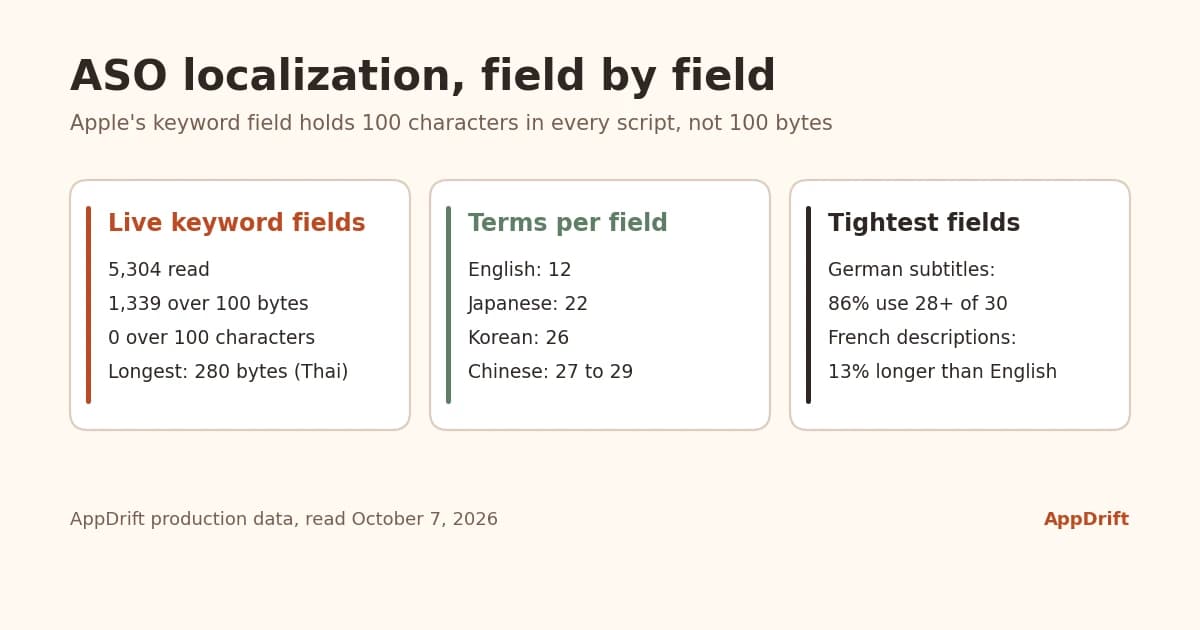
The live listings settle it. We read the keyword fields of every published App Store version imported into AppDrift from App Store Connect: 5,304 fields from 111 apps. 1,339 of them are longer than 100 bytes, and not one is longer than 100 characters. The longest is 280 bytes, in Thai, and no field is longer than 100 characters. Apple accepted and published all of them, so the limit it enforces is 100 characters.
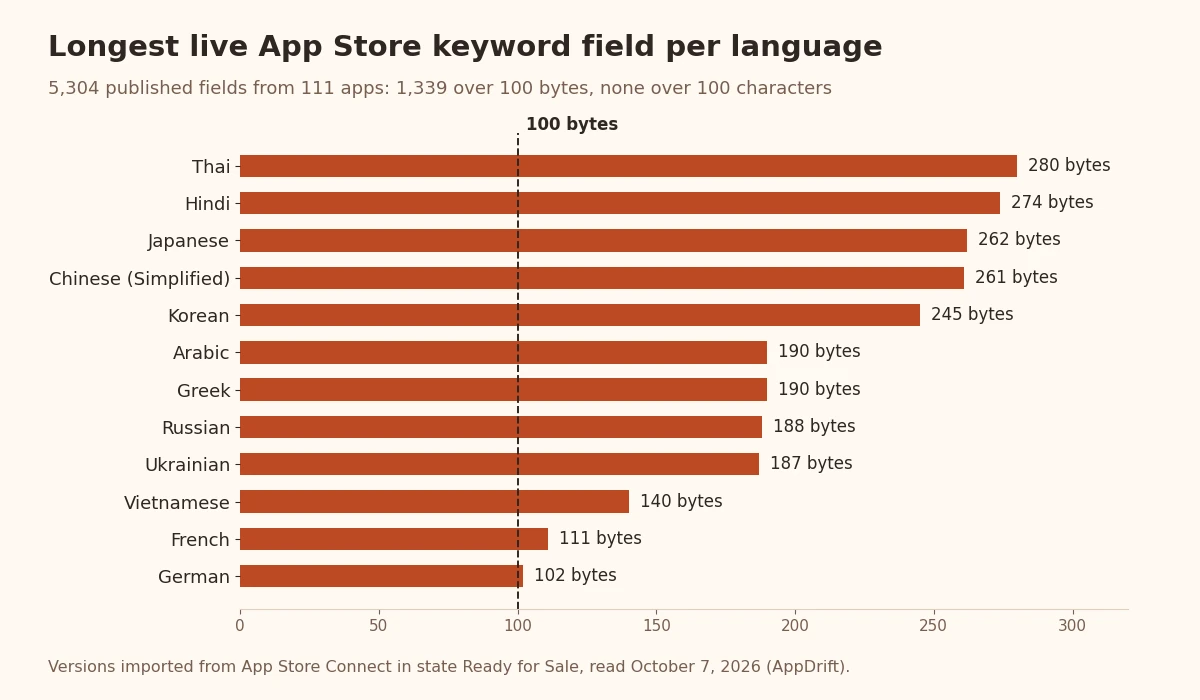
| Language | Live fields | Over 100 bytes | Longest (bytes) | Longest (characters) |
|---|---|---|---|---|
| Thai | 84 | 75 | 280 | 100 |
| Hindi | 72 | 45 | 274 | 100 |
| Japanese | 150 | 107 | 262 | 100 |
| Chinese (Simplified) | 130 | 76 | 261 | 100 |
| Korean | 109 | 69 | 245 | 100 |
| Arabic | 127 | 96 | 190 | 100 |
| Greek | 85 | 53 | 190 | 100 |
| Russian | 92 | 85 | 188 | 100 |
| Ukrainian | 134 | 124 | 187 | 100 |
| English (U.S.) | 683 | 37 | 181 | 100 |
Even English (U.S.) has 37 fields over 100 bytes, because of accented letters, symbols or words in other scripts. We know how costly the wrong unit is because we used it. From September 10 to October 1, 2026, AppDrift's tools followed the reference page and counted bytes, which cut AI-written keyword fields in Arabic, Cyrillic, Greek and Hebrew to about half of what Apple allows, and in Chinese, Japanese, Korean, Thai and Hindi to about a third. A customer report sent us to the data above, and every field is now counted in characters.
The practical rule: count characters, and treat any tool that counts bytes as under-filling your field. Our free store character counter checks each App Store and Google Play field in characters.
How much fits in each language
Characters are only half of it. The same idea takes very different space in different languages. To see how much, we compared 253 listing drafts that AppDrift generated in English plus at least one other language, each translation against the English draft of the same job.
| Language | Description length vs English | Keyword terms in a full field (English: 12) | Subtitles using 28+ of 30 characters (English in the same drafts) |
|---|---|---|---|
| Spanish (Spain) | 1.09× | 12 | 69% (81%) |
| Spanish (Mexico) | 1.14× | 11 | 71% (82%) |
| French (France) | 1.13× | 12 | 57% (83%) |
| French (Canada) | 1.31× | 11 | 68% (79%) |
| German | 0.97× | 11 | 86% (82%) |
| Portuguese (Brazil) | 1.09× | 11.5 | 64% (79%) |
| Arabic | 0.83× | 16 | 49% (80%) |
| Japanese | 0.51× | 22 | 0% (82%) |
| Korean | 0.55× | 26 | 0% (76%) |
| Chinese (Simplified) | 0.50× | 27 | 0% (85%) |
| Chinese (Traditional) | 0.38× | 29 | 0% (81%) |
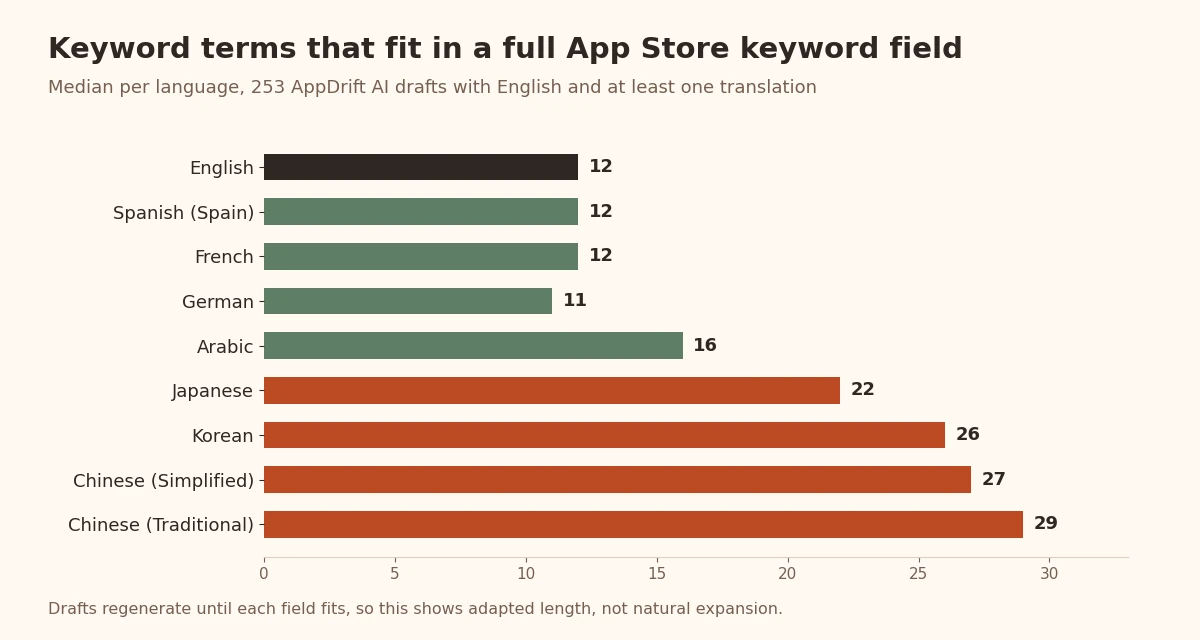
Three things follow for your listing:
- Chinese, Japanese and Korean fields hold about twice as many terms. A full field carried 22 to 29 terms against 12 in English. Translating your English list leaves half of that room unused, so research a longer list for these markets.
- German subtitles run tightest. 86% of German subtitles used at least 28 of 30 characters, more than any other language and more than the English drafts. Plan a shorter German phrase rather than squeezing the English one.
- French descriptions run long. French drafts were 13% longer than English and Canadian French 31% longer. If your English description is close to 4,000 characters, the French one may not fit without cuts.
Read these as drafts, not natural language. AppDrift regenerates a draft until every field fits its limit, so the table shows what fits after adaptation, not how long a straight translation would be. That is likely why German came out 3% shorter than English, although translators usually plan for German text to run longer. None of these drafts is a measure of what any store ranked.
Storefronts and languages are not the same thing
Each App Store storefront has a default language and, often, additional supported languages. Apple's table lists the US storefront with English (U.S.) plus Arabic, Chinese (Simplified and Traditional), French, Korean, Portuguese (Brazil), Russian, Spanish (Mexico) and Vietnamese; Japan's storefront supports Japanese and English (U.S.); and India's default is English (U.K.), with Hindi and the Indian languages Apple added this year.[7] Which localization a person sees depends on "the App Store language for their location, their device's language settings, languages you've added, and your primary language".
Search follows the same map. Apple says people "can search for your app using localized keywords in all countries or regions where the App Store supports" that language.[6] So a Spanish (Mexico) localization can also be searched in the US storefront. Apple publishes nothing about how several localizations in one storefront are combined or weighted, so treat that as a possibility to test, not as a second keyword field you can count on. And write it in real Spanish: Spanish speakers in the US and Mexico are the people who will read it.
Google Play works differently. Translations are shown by the shopper's language preference, while custom store listings can target countries: up to 50 listings, only one per country at a time, and none is translated automatically.[8]
Which languages developers localize first
Of 403 workspaces that generated or translated listings in AppDrift over the last year, 195 used at least one language other than English. These are the languages they chose most often:
| Language | Workspaces |
|---|---|
| Spanish (Spain) | 94 |
| French (France) | 66 |
| German | 59 |
| English (U.K.) | 50 |
| Japanese | 49 |
| Portuguese (Brazil) | 47 |
| Chinese (Simplified) | 39 |
| Italian | 37 |
| English (Canada) | 36 |
| Korean | 35 |
| Arabic | 34 |
| Turkish | 33 |
| Spanish (Mexico and Latin America) | 29 |
Popular isn't the same as right for your app. One detail is worth checking, though: workspaces chose Spain's Spanish three times as often as Mexico's, while the US storefront supports Spanish (Mexico). If most of your Spanish-speaking users are in the Americas, make sure you are writing the variant they read. Our article on the best languages for app localization goes through choosing markets from your own numbers.
An ASO localization workflow that holds up
- Choose markets from your own data. Start with the countries that already send visits, installs or reviews in another language, from App Store Connect and Play Console.
- Research keywords in each store, in its language. Use autocomplete with the storefront and language set to the market. An English search made in Germany is not a German search, and your English keywords translated literally are rarely what people type.
- Write each field, don't just translate it. Give each market its own name phrase and subtitle. Fill the App Store keyword field towards 100 characters with local terms, without repeating words already in the name, subtitle or category; Apple also treats plurals of words you have already used as duplicates.[4]
- Check every limit in characters. Especially the 30-character name and subtitle, the 100-character keyword field and Google Play's 80-character short description.
- Replace the screenshots. At least translate the captions, or the new localization keeps your primary-language images.
- Have a native speaker review it. Google says its machine translations "are not reviewed or approved by humans," and its listing policies apply to every translation.
- Publish, then track by storefront. Compare two-to-four-week windows of positions and installs per market before you judge a change.
Steps 2 to 4 are what AppDrift's metadata translation is built for: it drafts each market's listing from your app's context and checks every field in characters. You review and edit the result; nothing is published until you send it.
For step 7, keyword tracking records daily positions in 60+ storefronts, so each language can be read on its own.
Common ASO localization mistakes
- Translating the keyword list word for word. It keeps English search habits in a market that searches differently, and it wastes room in scripts that fit more terms.
- Counting bytes. A byte-counting tool will tell you a full Japanese or Arabic field is over the limit when Apple would accept it.
- Shipping English screenshots in a new localization. Apple copies the primary language's screenshots into a new localization by default.
- Using Spain's Spanish or France's French everywhere. Mexico and Canada have their own localizations on the App Store, and different words.
- Publishing machine translation unreviewed. Errors in the name or subtitle are the first thing a local shopper sees.
- Expecting a known uplift. We found no study with a stated method that measures what listing localization does to installs. The figures that circulate, such as "+128% downloads", trace back to vendor reports whose method we could not find. The closest peer-reviewed work, on top-grossing apps, links supporting more languages with ranking in the top 50 but does not measure listings or show cause.[9] Measure your own markets.
If you also publish on Google Play, our Google Play SEO guide explains where keywords go when there is no keyword field.
Frequently asked questions
What is ASO localization?
ASO localization is researching keywords and writing your store listing for each market in its own language: the name, subtitle, keyword field, description and screenshots on the App Store, and the name, short description, full description and graphics on Google Play. It is separate from translating your app's interface.
Is the App Store keyword field 100 characters or 100 bytes?
100 characters. App Store Connect's reference page says 100 bytes, but Apple's search guidance says 100 characters, and 1,339 of 5,304 live keyword fields we read are over 100 bytes while none is over 100 characters.
How many languages can I localize an App Store listing into?
50. Apple added 11 localizations on March 31, 2026, including Bangla, Gujarati, Kannada, Malayalam, Marathi, Odia, Punjabi, Slovenian, Tamil, Telugu and Urdu.
Does Google Play translate my listing automatically?
Partly. For languages you haven't added, Google Play offers shoppers an automated Google Translate version of your page, with a notice that it was translated automatically. Play Console's free machine translation and paid human translation are separate options that you choose to apply to your listing.
Do I need to localize my screenshots?
If you want local shoppers to read them, yes. Apple copies your primary-language screenshots into a new localization, and Google shows the default language's graphics when a translation has none of its own.
Can a second localization add keywords in the US App Store?
Possibly. Apple says localized keywords are searchable wherever the App Store supports that language, and the US storefront supports Spanish (Mexico) and eight other languages besides English. Apple doesn't say how localizations are weighted, so test it and write the localization for real readers.
How we measured
Live keyword fields. On October 7, 2026 we read, as aggregates, the keyword field of every App Store localization belonging to a version imported from App Store Connect with Apple's state Ready for Sale: 5,304 non-empty fields from 111 apps in 95 workspaces, 12 of them apps of AppDrift's own team. We counted characters and UTF-8 bytes; no keyword text left the database.
Listing drafts. 558 AppDrift metadata-generation jobs from November 19, 2025 to October 7, 2026, from 403 workspaces, excluding AppDrift staff. The language comparison uses the 253 jobs with English (U.S.) and at least one other language; each ratio compares a translation with the same job's English, and we report medians. Languages with fewer than eight workspaces are left out. These drafts are regenerated until they fit each field, so they show adapted length, not natural expansion.
Languages chosen. The same 403 workspaces, counting each workspace once per language after merging codes such as ja and ja-JP.
Sources
- Apple Developer News: App Store Connect supports 11 new languages (March 31, 2026)
- Google Play Console Help: Translate and localize your app
- App Store Connect Help: Platform version information
- Apple Developer: App Store search
- Google Play Console Help: Create and set up your app
- App Store Connect Help: Localize app information
- App Store Connect Help: App Store localizations
- Google Play Console Help: Custom store listings
- Picoto, Duarte and Pinto, Journal of Business Research 101 (2019)