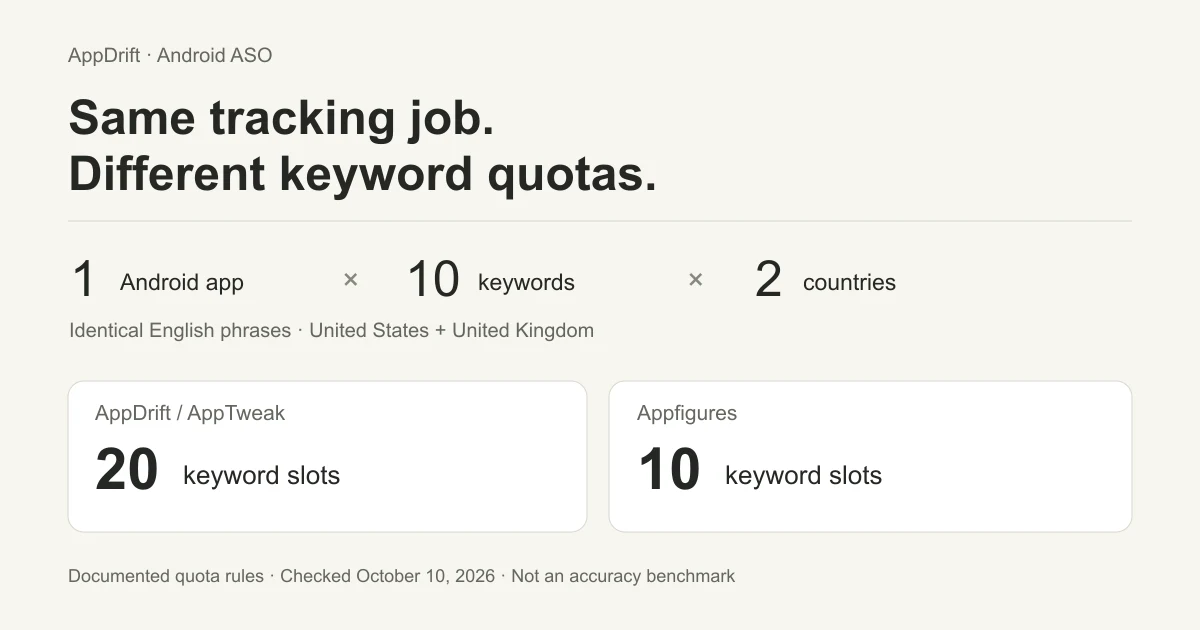
An Android ASO tool should tell you where your app ranks on Google Play, in which country and language, and when it last checked. Before comparing keyword allowances, define the same tracking job for every tool. Ten keywords in two countries can consume ten slots in one product and twenty in another.
This comparison uses one Android app, ten identical keyword strings and two English-language markets: the United States and the United Kingdom. It compares AppDrift, AppTweak, Appfigures and Asodesk with Google Play Console, then gives you a worksheet for evaluating your own app. For broader iOS and Android research suites, see our best ASO tools comparison.
Prices and documentation checked October 10, 2026. AppDrift is our product. This is a comparison of documented features and pricing, not a hands-on test of the competing tools. The two Wikipedia rank observations below were collected through our own public checker; they are the only original rank measurements in this article.
Android ASO tools compared
The paid prices below are public USD month-to-month list prices, excluding annual discounts and temporary offers. The keyword column describes the tracking allowance, not how many searches people make. Plans also include features beyond this small tracking scenario.
| Tool | Observed plan and allowance | Our ten-keyword, two-country scenario | Tracking detail to check |
|---|---|---|---|
| AppDrift | Free: 5 tracked keywords, 1 app. Indie: $29/month, 2,500 keywords, 10 apps.[1] | 20 tracked rows. The full scenario exceeds the free allowance. | Daily tracking; Google Play searches cover approximately the first 30 results. A missing rank is bounded by that depth. |
| AppTweak | Essential: $99/month, 500 keywords, 5 followed apps.[2] | 20 slots: another country or language consumes another keyword slot.[3] | The keyword-table metrics refresh every 24 hours.[3] The pricing documentation describes Google Play search volume as modeled. |
| Appfigures | Monitor: $44.99/month, 100 keywords, daily updates.[4] | 10 slots: an identical keyword string counts once across apps and countries.[5] | Hourly updates belong to the higher Optimize plan; do not assume Monitor includes them. |
| Asodesk | Free: 200 keywords, 1 app, 400 Daily Keyword Stats. Pro: $59/month, 700 keywords, 2 apps, 2,000 Daily Keyword Stats.[6][7] | Country-based slot accounting was not verified in the public documentation we inspected. | Ranks refresh at least every 24 hours. Daily Keyword Stats are a separate usage quota, spent on actions such as adding keywords, exports and refreshes.[8][9] |
| Google Play Console | Native reporting for an app you manage; no separate ASO-tool subscription is specified in the reporting documentation. | Not an equivalent third-party keyword-position tracking plan. | Reports listing engagement and acquisition outcomes for your app. Use it alongside rank observations, with the correct metric definitions.[10] |
AppDrift fits when you want country-specific rank tracking alongside listing metadata, translation and publishing. Its free plan is enough to try a small set of tracked terms before paying. Its Google Play depth is also a real limit: if your evaluation requires positions beyond roughly the first 30 results, establish deeper coverage before buying a tool. The comparison does not establish which vendor is most accurate.
Count countries before comparing keyword quotas
Write down the unit you need to observe: app × exact keyword × country × language. In our scenario, ten identical English phrases across the US and UK produce twenty country-specific tracking combinations. That does not mean every vendor deducts twenty units from its plan.
- AppDrift counts tracked rows. The same keyword for an app in the US and UK creates two rows. Ten terms in both countries need twenty slots.
- AppTweak counts store, country and language combinations. Repeating a keyword in another list does not use another slot for the same combination; adding a country does. Our scenario needs twenty.
- Appfigures counts the exact keyword once across apps and countries. Our scenario uses ten. A translated phrase is a different string, so this should not be read as unlimited distinct translations.
- Asodesk has both keyword and activity allowances. Its documented free plan is substantial enough to deserve inclusion, but we could not establish the exact country deduction from the inspected sources. Confirm that rule and the Daily Keyword Stats needed for your workflow.
This is why dividing a subscription price by its headline keyword allowance gives a misleading buying comparison. A plan may cover your terms but still differ in history, refresh frequency, export access or result depth. Check those against the same worksheet before expanding the keyword list.
A real example: one keyword, two Google Play markets
We queried Wikipedia’s Android package, org.wikipedia, for encyclopedia in the US and UK through AppDrift’s public rank checker. Both requests used English and returned fresh results rather than cached responses.
| Market | Keyword | Observed rank | Search depth | Request time (UTC) |
|---|---|---|---|---|
| United States | encyclopedia | 1 | 30 | 2026-10-11 00:47:47 |
| United Kingdom | encyclopedia | 2 | 30 | 2026-10-11 00:47:49 |
Download the two observed results (CSV). This is one app and one keyword observed twice, not twenty completed checks or a benchmark of the competing tools. Wikipedia is a public example, not a customer case study.
The immediate lesson is to keep the country attached to the rank. These two observations do not prove a lasting US–UK difference or explain its cause. Google says the results available to a person can also depend on device, location, carrier and supported features.[11] A rank from a store-data provider is therefore a repeatable observation under stated conditions, not a promise of what every phone will show.
Search depth matters just as much. If a checker returns thirty results and your app is absent, record “not found in the returned top 30”. Do not turn that into position 31, zero, or “removed from Google Play.” Our guide to checking app rankings explains how to interpret missing observations.
Use this twenty-row evaluation sheet
Download the Android ASO tool evaluation sheet (CSV). It contains twenty blank observation rows: ten placeholder keywords, each repeated for the US and UK. It is a template, not a dataset of measured rankings. Replace the package, phrases and markets with your own.
- Choose ten phrases that describe real app tasks. Keep the exact strings fixed while comparing tools. If you need help writing the listing afterward, use our separate Google Play SEO guide.
- Set country and language explicitly. Confirm that the tool actually supports those Google Play markets. A country selector on an iOS feature does not establish Android coverage.
- Record the observation time and freshness. Save the last successful update where the tool exposes it. The time you opened the page may be later than the time the result was collected.
- Keep missing observations visible. Record the searched depth and distinguish an absent app from a failed request. Do not replace either with an invented numerical rank.
- Inspect the allowance before and after adding the set. Record the actual deduction and whether refreshes or exports spend a separate quota. For an unverified rule, leave the cell unknown until you can check it.
- Repeat under the same settings. One snapshot demonstrates the workflow. A later observation establishes whether the tool can provide the history you need; it still does not establish why a rank changed.
The sheet includes fields for tool, keyword, country, language, checked-at time, source-update time, rank, depth, missing/error status and quota notes. Use a separate copy for each tool so you can compare the same task without mixing observations from different providers.
Separate ranking, estimated demand and Play Console results
These answer three different questions. A rank observation says where an app appeared for a particular search under a tool’s collection conditions. A demand estimate is a vendor’s model of how often a phrase might be searched. A Play Console metric records a defined action involving your own app.
AppTweak describes its Google Play volume as an algorithmic estimate. Asodesk labels its Daily Impressions and Estimated Installs as approximations. Appfigures describes its popularity indicator as using Apple Search Ads and other collected information; that is not a raw count of Google Play searches. AppDrift’s observed rank should not be presented as search volume either. A precise-looking score does not make these measures interchangeable.
On the outcome side, Google’s current Play Console documentation describes listing clicks and click-through rates after a July 2026 reporting change. Completed acquisitions remain available separately in Grow users overview, Statistics and downloadable reports. Search-term, country and language breakdowns can help you understand your traffic, while small search terms may be grouped into “Other.” An install-button click is not itself a completed installation.[10]
When evaluating a listing change, keep the country, dates, traffic source and metric definition consistent. Record the release date alongside rank history, then inspect the owner-side result. A higher observed rank alone does not prove more installs, and more installs alone do not prove that the text edit caused them.
Frequently asked questions
Are there free ASO tools for Android?
Yes. AppDrift has a free plan with five tracked keywords for one app. Asodesk documents a free plan with 200 keywords for one app and 400 Daily Keyword Stats, selectable after its trial; its country-counting rule was not verified here. Google Play Console supplies reporting for your own app. Check the exact tracking scope and quotas before treating these as equivalent offers.
Does Google Play Console replace a keyword rank tracker?
It serves a different measurement task. Play Console reports activity and outcomes for an app you manage, including available search-term breakdowns. The reporting documentation reviewed here does not provide an equivalent country-by-country keyword-position history. Keep native reporting and external rank observations separate.
What is the best Android ASO tool for a small app?
Start with the work you need to repeat: a fixed set of relevant keywords in your actual countries and languages. AppDrift fits daily rank tracking together with listing preparation and publishing, provided its roughly top-30 Google Play depth meets your needs. Use the worksheet to verify coverage, freshness and quota costs before committing to a larger plan.
Method and next step
We checked public vendor pricing and help pages on October 10, 2026, using monthly USD list prices. We did not create competitor accounts or test their accuracy. The original sample comprises two successful, uncached requests to AppDrift’s public checker for one public Android app and one keyword, seconds apart. No errors or missing results were excluded. The downloadable sample preserves both observations; it contains no customer account data and supports no claim about downloads or conversion improvement.
Check your Android app’s rank in one target country, record the result and its depth, then repeat for the second market. That gives you the first two rows of your own evaluation.