You can check a keyword ranking manually, use a free rank checker, or set up daily tracking. A manual check shows what the store returns on your device. A checker reads the returned results for you, while daily tracking keeps a history. This guide explains when to use each method.
What does an app store keyword ranking actually mean?
Your keyword ranking is your app's position in the search results when a user types that keyword into the App Store or Google Play. If someone searches "habit tracker" and your app is the fourth result, you rank #4 for that keyword in that country's storefront.
Rank measures visibility for a particular query and storefront. A higher position may expose the app to more people, but rank alone does not establish search demand or installs. There is no universal top-three tap share or zero-traffic cutoff at position 30.
Rankings are also per-country (your #3 in the US can be a #40 in Germany) and per-store — the same keyword has completely different competition on the App Store versus Google Play.
Method 1: Check manually in the store
The zero-tool approach: open the App Store or Play Store, type the keyword, and count down until you find your app.
It works, but know its limits:
- Context can differ. Account, device, store country, language and timing can affect the result you see. Record the context when comparing observations.
- You can only check your own storefront. Checking your rank in Japan or Brazil means switching store regions, which is tedious on iOS and unreliable on Android.
- It doesn't scale. Checking 20 keywords across 5 countries manually is 100 searches, every time.
Manual checks are fine for a quick sanity look at one or two keywords in your home market. For anything more, use a tool.
Method 2: Use a free rank checker
A rank checker queries a data source for a chosen app, keyword and country, then locates the app within the returned results. AppDrift's free rank checker provides a snapshot and the returned top results without signup. Provider sampling and caching can differ from a device search.
Check how many results the tool can return:
- App Store: AppDrift's collector can return up to roughly 200 results. Record the available depth rather than assuming every query returns that many.
- Google Play: AppDrift's current public collector often returns roughly 30 results. Absence means the app was not found in that sample; it does not prove zero installs, delisting or that another provider's deeper ranks are invented.
Before using metadata space, compare the relevance and observed competition of candidate terms with the difficulty checker. Treat scores and long-tail alternatives as research aids, not install predictions.
Method 3: Track rankings daily to compare trends
A single check shows one moment. To see whether a change lasts, use daily keyword tracking to record positions each day, mark metadata release dates and spot drops that need a closer look.
History helps you compare the periods before and after an approved metadata change. Log the release date, store, country and other changes. A 14-day comparison can be useful if traffic supports it, but remains observational: it does not isolate the cause of a rank movement.
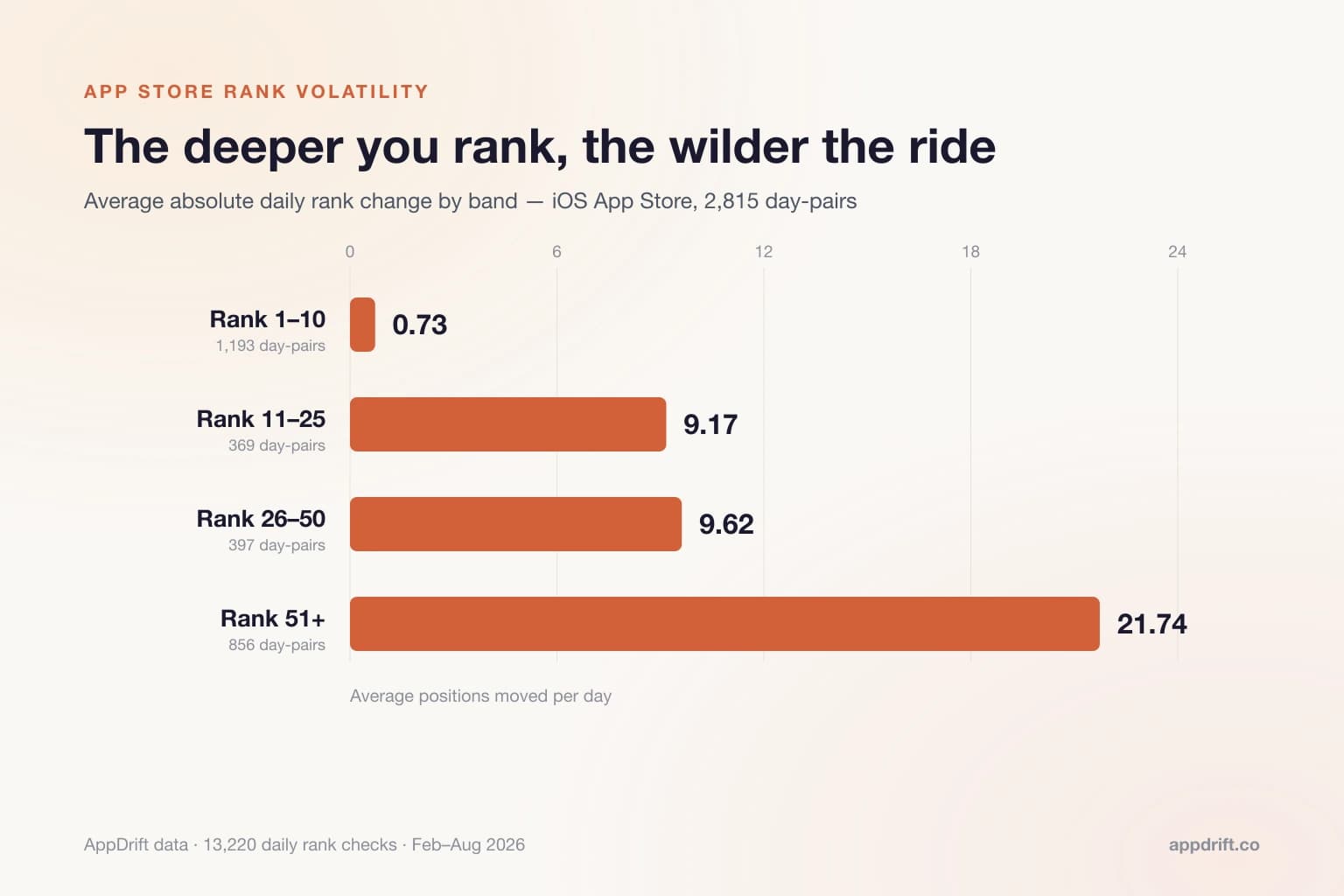
Daily sampling also matters because of how much ranks move on their own. Across 13,220 of our daily rank checks, iOS positions moved an average of 9.48 places from one day to the next — and below rank 50 the average daily swing was 21.74 places. We broke the numbers down by rank band in our study of how much app store rankings actually move, which is worth reading before you react to any single-day drop.
What's a good ranking — and what should you do at each level?
- Top positions: confirm relevance and look at acquisition/conversion evidence before deciding whether to protect or expand the term.
- Other visible positions: inspect the result layout, competing apps and audience match. No field-placement formula guarantees a move into the top three.
- Lower observed positions: decide whether the term is important enough to investigate or test. A rank does not identify how quickly it will respond to an edit.
- Not found: check returned depth, collection status, country and the direct listing. Record absence separately from a numeric rank.
If you are comparing countries, inspect the listing in each market directly. An app’s supported-language field does not tell you whether its store page has been translated. Choose languages your app and support team can serve.
Frequently Asked Questions
How do I check my app's ranking for a keyword?
Use a rank checker: enter your app, the keyword, the store, and the country, and it reports your observed position in that store's search results. Manual store searches work for spot checks but are skewed by personalization and limited to your own storefront.
Is there a free app store rank checker?
Yes — AppDrift's rank checker is free with no signup, covers both stores and 10 countries, and shows the returned top 10 for context alongside your position.
What is a good keyword ranking for an app?
A useful rank depends on the query's relevance, audience and result layout. Higher visibility can help, but rank alone does not prove installs or a universal traffic threshold.
Why do different tools show different ranks?
Tools can differ in country, time, data source, sampling, caching and returned depth. Compare the same app/query/market and check each provider's method before attributing a discrepancy to an error.
How often should I check my rankings?
Track important keywords automatically each day. Mark your publication dates so you can compare the periods before and after an edit, while accounting for other changes.